From transcript to meeting minutes – automatically with AI
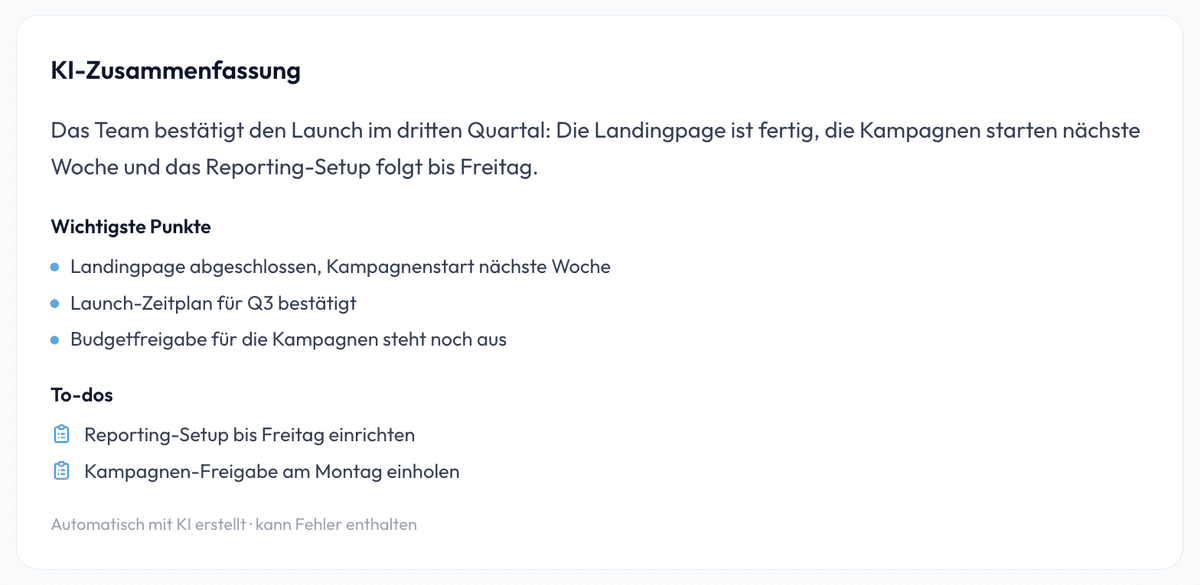
Nobody enjoys writing minutes. SmartScription transcribes your meeting with speaker detection and uses AI to build the foundation of your minutes: a compact summary, the most important key points and open action items – exportable as Word or PDF.
Quick answer
Upload the recording → automatic transcript with speakers and timestamps → AI summary with TL;DR, key points and action items. Export the finished document as Word or PDF – your minutes are ready in minutes, not hours.
Create minutes automatically – in 3 steps
- 1
Upload the meeting: drag & drop the audio or video recording (e.g. exported from Teams or Zoom).
- 2
Review the transcript: the AI produces a verbatim transcript with speaker separation and timestamps. Simply rename “Speaker 1” to real names.
- 3
Generate the AI summary: one click produces TL;DR, key points and action items – the finished basis for your minutes, exportable as Word or PDF.
Transcript or minutes – what’s the difference?
A transcript captures every spoken word – important for traceability and quotes. Minutes condense the conversation into outcomes: decisions, responsibilities, next steps. SmartScription delivers both from one recording: the complete, searchable verbatim transcript, and via AI summary the building blocks for outcome-focused minutes.
Why automatic minutes pay off
AI summary with action items
TL;DR, key points and open tasks are generated automatically from the transcript – you only add decisions and details.
Who said what?
Automatic speaker separation with timestamps makes statements attributable and quotable – speakers can be renamed.
Export as Word & PDF
Export transcript and summary as DOCX or PDF and drop them straight into your minutes template.
Time savings that add up
Instead of 1–2 hours of post-meeting work: upload the recording, generate the summary, review briefly. Minutes are done in minutes.
Is meeting transcription worth it for minutes?
If you write minutes regularly, automatic transcription typically saves 60–90 minutes per meeting – with more complete documentation, because nothing important gets lost. For sales and customer calls it pays off twice: the transcript serves as memory, the AI summary as a ready-made CRM note. With 60 free minutes per month you can test the workflow risk-free.
Verbatim, summary or resolution minutes?
Before you start writing, it is worth asking which kind of minutes is actually needed. Verbatim minutes reproduce the course of the discussion and suit negotiations or committees where it must remain traceable who made which argument. Summary minutes record only the outcome — the usual form for team and project meetings. Resolution minutes are limited to formal decisions including the voting result and are required on boards, supervisory boards and in associations. A complete transcript is the best basis for all three: for verbatim minutes you use the wording with speaker labels, and for summary or resolution minutes you condense it down to the decisions.
How usable minutes are structured
Minutes that someone will still read later almost always follow the same structure: header data (date, time, location or tool, participants, who took the minutes), then a short summary of the discussion for each agenda item, followed by the resolutions in their exact wording and finally a list of action items. The action list is the decisive part: every task needs a responsible person and a deadline, otherwise nothing happens. That very three-part split — summary, key points, tasks — is what the SmartScription AI summary already delivers as a draft, so you only add names and dates and approve the text.
From transcript to finished minutes
The fastest route takes three steps. First, have the recording transcribed — you receive the full text with speaker labels and timestamps. Second, generate the AI summary, which proposes a TL;DR, key points and action items. Third, proofread. Check numbers, proper names and the wording of resolutions in particular, because those are the places where automatic systems are most likely to be wrong. The timestamps let you jump back to any disputed passage and listen again if in doubt. You export the finished minutes as a Word file for further editing or as a PDF for distribution.
Confidentiality, consent and retention
Recording a meeting is not a given: inform everyone involved beforehand and obtain their consent — in many situations that is not merely polite but mandatory. Note in the header that the meeting was recorded. For the processing itself, SmartScription's rule is this: the file is processed exclusively on EU servers and deleted automatically after transcription, so no copy of the audio remains with us. The transcript stays in your account until you delete it. How long you keep minutes depends on your internal rules and the statutory retention periods for the type of document.
Frequently Asked Questions
How does a transcript become minutes?
After transcription, one click creates an AI summary: TL;DR, key points and action items. Take these building blocks into your minutes template – exported as Word or PDF.
Does the AI recognize who is speaking?
Yes, transcription distinguishes speakers automatically and timestamps every contribution. Simply rename the generic labels (“Speaker 1”).
Does it work with Teams or Zoom recordings?
Yes. Export the recording (MP4 or audio) and upload it – SmartScription works independently of your meeting tool.
Can I edit the transcript?
Speakers can be renamed, and you can export transcript and summary for free editing – e.g. in Word.
Is it GDPR-compliant?
Processing happens exclusively on EU servers, audio files are deleted automatically after transcription, and content is never used for AI training. Do inform participants that the meeting is recorded.
What do automatic minutes cost?
60 minutes of transcription per month are free – including the AI summary. Starter and Pro plans cover teams with many meetings.
How long does it take to turn a recording into minutes?
Transcribing a one-hour meeting is usually finished within a few minutes, and the AI summary then takes only seconds. Allow another 10 to 20 minutes for proofreading and adding owners and deadlines — compared with taking notes by hand and reworking them afterwards, that typically saves a good hour per meeting.
Do I still have to check the automatic minutes?
Yes. The summary is a draft, not an approved document. Check numbers, proper names, deadlines and the exact wording of resolutions above all. The timestamps in the transcript let you find any passage again within seconds.
Can I produce minutes for international teams?
Yes. The transcript and the summary can be translated into more than 20 languages, with speaker labels and timestamps preserved. That way you send the same minutes in English and German without writing them twice.