Transcribe Audio – Automatically with AI
Turn your audio files into text quickly and accurately. SmartScription uses advanced AI speech recognition, among the most accurate technology in the world, to automatically transcribe your recordings. Whether it's a podcast, interview, lecture, or voice memo – upload your file and receive a complete text transcript in just a few minutes.
Quick answer
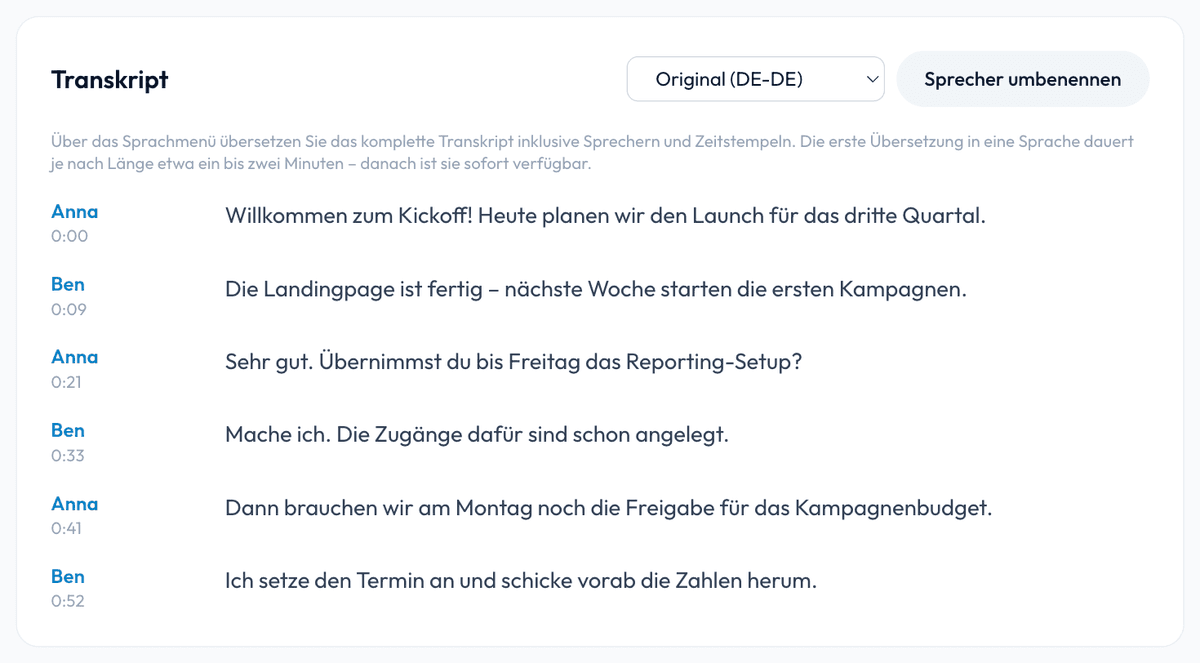
Yes — SmartScription transcribes audio and video to text automatically, detects who said what (speaker recognition) with timestamps, and exports to Word, PDF, and subtitles (SRT/VTT). It supports 70+ languages, runs entirely on EU servers, and deletes your audio after transcription.
How Audio Transcription Works
The process is straightforward: upload your audio file, our AI analyzes the spoken language, and creates a detailed text transcript. You can download, copy, or further process the result. Supported formats include MP3, WAV, M4A, OPUS, MP4, and WEBM. Files up to 3 hours are processed directly in one pass – up to 2 hours on Starter, 60 minutes per file on the free plan.
Benefits of Automatic Audio Transcription
Lightning-Fast Results
Get your transcript in minutes, not hours. Our optimized pipeline ensures fast processing even for longer recordings.
High Accuracy
Our AI recognizes spoken language with outstanding precision. Trained on vast amounts of audio material, it delivers consistently high-quality results.
70+ Languages
Transcription in more than 70 languages. English, German, Spanish, French, Italian, Dutch and Portuguese are detected automatically – for any other language, simply pick it before uploading.
GDPR Compliant
All data is processed and stored on EU servers in West Europe. Audio files are deleted after transcription. No training with your data.
Who Benefits from Audio Transcription?
Automatic audio transcription saves time across numerous professions and use cases. Journalists transcribe interviews and press conferences. Researchers convert qualitative interviews into searchable text. Content creators produce subtitles, show notes, and blog posts from their podcasts and videos. Students transcribe lectures for review. Businesses automatically document meetings and conference calls. Sales teams document customer conversations in a GDPR-compliant manner.
Supported Audio Formats
SmartScription supports all common audio and video formats: MP3, WAV, M4A, OPUS, MP4, and WEBM. You don't need to convert your files beforehand – just upload them and we'll handle the rest. Files up to 3 hours are transcribed in a single pass – no splitting required (2 hours on Starter, up to 60 minutes per file on the free plan). WhatsApp voice messages (.opus) work too – export, upload, done.
Subtitle & caption generation (SRT & VTT)
Turn any audio or video file into ready-to-use subtitles. SmartScription generates time-coded captions with speaker labels, so you can publish accurate subtitles for YouTube, social clips, e-learning and accessibility – no manual syncing required. Export to the two most widely supported subtitle formats in one click.
SRT
The classic subtitle format, supported by YouTube, Premiere Pro, DaVinci Resolve and virtually every video editor and player.
VTT (WebVTT)
The web-native caption format for HTML5 video and modern players – ideal for websites and streaming.
Frequently Asked Questions
How long does it take to transcribe an audio file?
The duration depends on the length of the recording. Typically, transcription takes just a few minutes – even for longer files. A 30-minute recording is usually transcribed in 2-5 minutes.
What audio quality is required?
The clearer the recording, the better the result. However, the AI handles background noise and various dialects well. For best results, we recommend a clear speech recording.
Can I edit the transcription?
Yes, you can download the transcript after creation and further edit it in any text editor.
What happens to my audio file after transcription?
Your audio file is automatically deleted after successful transcription. We do not permanently store audio data. Only the text transcript remains in your account.
Can I transcribe interviews and podcasts?
Yes. SmartScription is ideal for interviews, podcasts, lectures and voice memos. Just upload the recording – the spoken language is detected automatically.
Is audio transcription free?
You can start for free: 60 minutes of transcription per month, no credit card. For more volume there is Starter with 10 hours (€5.99) and Pro with 40 hours (€14.99) per month.
Can I transcribe video files, not just audio?
Yes — SmartScription accepts video too (MP4, WebM) and transcribes the audio track. You can export the result as subtitles (SRT/VTT) for the video.
Does it recognize different speakers and add timestamps?
Yes. It automatically detects and labels each speaker with timestamps; you can rename speakers and export to Word, PDF, or subtitles.
Can I translate the transcript afterwards?
Yes. After transcription you can translate the whole transcript right in SmartScription into 20+ languages – including speakers, timestamps and the AI summary. The translation can also be exported as subtitles (SRT/VTT) or as a document.
Can I transcribe WhatsApp voice messages?
Yes. Export the voice message from WhatsApp (share → save or forward) and upload the .opus file directly – SmartScription turns it into text. You can then translate the result into 20+ languages if needed.