Translate and summarize transcripts with AI
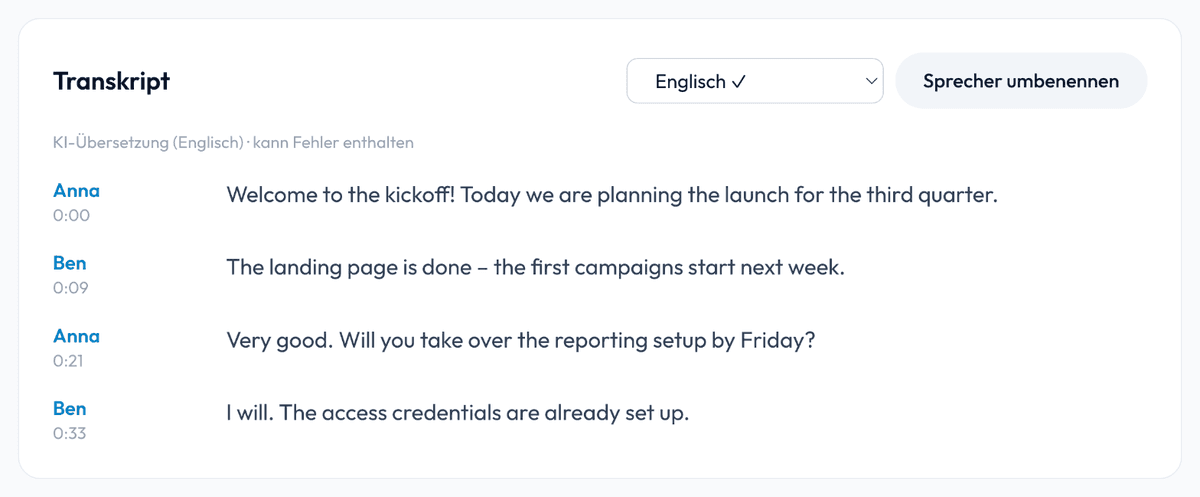
A recording becomes more than text: SmartScription translates finished transcripts into 20+ languages with one click and, on request, creates an AI summary with TL;DR, key points and action items. Speakers and timestamps are fully preserved – ideal for international teams, interviews and videos with foreign-language audiences.
Quick answer
Create a transcript, pick the target language – done. The translation carries over speakers, timestamps and even the summary; subtitles (SRT/VTT) export directly in the target language. The first translation takes one to two minutes depending on length; afterwards it loads instantly.
Translate transcripts into 20+ languages
After transcription, simply pick the target language in the transcript – English, Spanish, French and many more. The AI translates the whole conversation in context rather than word for word: technical terms, names and numbers are preserved, and every statement stays attached to its speaker and timestamp. Once translated, the language version is stored permanently and loads instantly.
20+ languages
From English and Spanish to Japanese – create as many language versions per transcript as you need.
Subtitles in the target language
Export the translation directly as an SRT or VTT file – ready-made foreign-language subtitles for your videos.
Speakers & timestamps preserved
The translation keeps the full structure: who said what and when stays exactly traceable.
Translate once, available forever
Translations are stored – switching between the original and language versions is instant afterwards.
Transcripts in English – even from recordings in other languages
A German meeting, a Spanish interview, a French video: upload the recording, SmartScription transcribes it in the original language – and one click gives you the complete transcript in English, with the same speakers and timestamps and, if you like, as English subtitles (SRT/VTT). It works the other way round too: turn an English transcript into a German, Spanish or French version for your international team.
AI summary: TL;DR, key points and action items
Grasp long recordings in seconds: the AI summary condenses every transcript into a short digest, the most important points and concrete tasks. If you translate the transcript, an existing summary is translated along with it – international colleagues get the result directly in their language.
TL;DR
The essence of the conversation in a few sentences – to quickly decide whether and where to dig deeper.
Key points
The most important statements and decisions as a clear list.
Action items
Concrete tasks and next steps, extracted straight from the conversation.
Typical use cases
International meetings: minutes in German, summary for the English-speaking team in English. Interviews: translate quotes without losing speaker attribution. Video content: transcribe once, export subtitles in several languages. Research: transcribe foreign-language interviews and analyze them in your own working language.
Frequently Asked Questions
Which languages are supported for translation?
More than 20 languages, including English, Spanish, French, Italian, Dutch, Portuguese, Polish, Turkish, Russian, Ukrainian, Arabic, Chinese, Japanese and Korean. You can create as many language versions per transcript as you like.
Are speakers and timestamps preserved in the translation?
Yes, fully. Every translated statement stays attached to its speaker and timestamp – custom speaker names are carried over too, and subtitle exports work in the target language exactly as in the original.
How long does a translation take?
Usually one to two minutes depending on transcript length. The translation is then stored and available instantly on the next visit.
Is the summary translated as well?
Yes. When you translate a transcript, an existing AI summary is translated along with it – TL;DR, key points and action items appear in the chosen language.
What does the AI summary contain?
A short digest (TL;DR), the most important key points and concrete action items or decisions from the conversation. The summary is created in the language of the transcript.
Are translation and summary GDPR-compliant?
Yes. Like the transcription itself, translation and summarization run exclusively on EU servers. Your content is never used to train AI models.
Can I translate a German transcript into English?
Yes. Transcribe the German recording in its original language and pick “English” as the target language in the finished transcript. You get the complete transcript in English – with the same speakers and timestamps – and can export it as Word, PDF or English subtitles. The same works for Spanish, French and many other recordings.